
Your client emails: "You charged the wrong rate. Can you fix the invoice?"
You pause. The invoice was sent three weeks ago. They have not paid yet. The rate was wrong — you invoiced £120/hour instead of £100/hour. The project fee is £600 too high.
You know you cannot just edit the invoice. That breaks accounting rules and confuses HMRC. But you also do not want to ghost the client or confuse them with accounting jargon.
A credit note is the fix. It is a document that reduces the amount owed on an invoice. You do not delete the original invoice or send a new one with the same invoice number. You issue a credit note referencing the mistake, and the client pays the corrected amount.
This guide gives you three copy-paste UK credit note templates with GBP examples for designers, developers, and consultants, explains when to issue a credit note versus reissue the invoice versus refund cash, shows you how to handle VAT on credit notes, and includes email scripts for when clients ask for a "corrected invoice" instead of a credit note, or when they want a refund versus credit on account.
What a credit note is (and when UK freelancers need one)
A credit note (sometimes called a credit memo) is a document you issue to reduce the amount owed on an invoice. It works like a negative invoice. The original invoice stays on record. The credit note adjusts what the client owes.
Example: You invoiced £3,000. You overcharged by £600. You issue a credit note for £600. The client now owes £2,400.
Common reasons to issue a credit note
✓ You overcharged (wrong hourly rate, wrong quantity, arithmetic error)
✓ You invoiced for work not delivered (client reduced scope, you could not complete the full brief)
✓ Client overpaid and you agreed to credit the excess rather than refund it
✓ You agreed a discount or adjustment after the invoice was sent
✓ You invoiced duplicate charges or billed something twice
✓ Client returned deliverables or cancelled after you invoiced but before work started
What a credit note is not
A credit note is not:
✗ A refund (a credit note is the document; the refund is the cash you send back, if you send it back)
✗ An edited invoice (never edit an invoice after it is sent — issue a credit note instead)
✗ A cancellation of the contract (the credit note adjusts the invoice; it does not void the agreement)
✗ Proof of payment (it is an accounting adjustment, not a receipt)
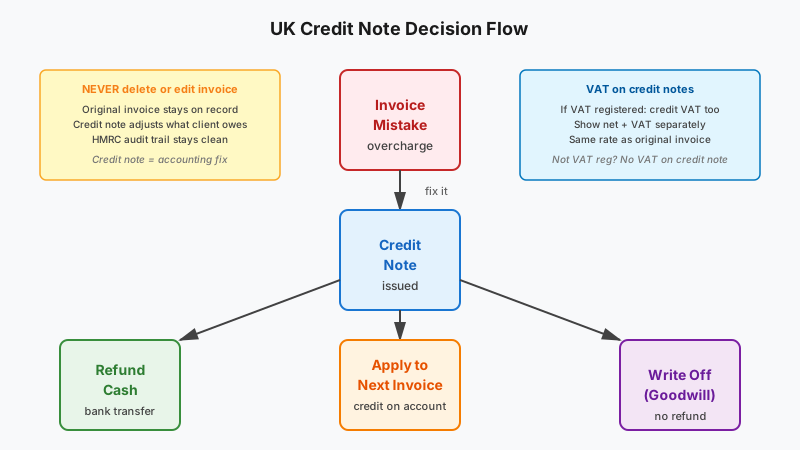
The credit note is the accounting record. What you do with it — refund cash, apply the credit to the next invoice, or write it off — is a separate decision.
Credit note vs refund vs reissue invoice — the decision tree
When you make an invoicing mistake, you have three options. Here is when to use each.
Option 1: Issue a credit note to reduce the amount owed
When to use:
✓ The invoice has been sent and is unpaid or partially paid
✓ The error is clear and measurable (overcharged £X, wrong rate, wrong quantity)
✓ You want to keep the original invoice on record and adjust it cleanly
✓ The client has accounting processes and needs a paper trail
Example: You invoiced £4,000 for a website build. The client points out you agreed £3,500. You issue a credit note for £500. They pay the net £3,500.
Why not just edit the invoice? Editing an invoice after it is sent breaks HMRC audit rules. The original invoice is a legal tax document. Deleting or changing it after the fact creates a gap in your accounting records. Always issue a credit note instead.
Option 2: Issue a credit note + new invoice when you need to reissue everything
When to use:
✓ The invoice is fundamentally wrong (wrong client, wrong scope, wrong VAT treatment)
✓ The client explicitly needs a "corrected invoice" and will not accept a credit note adjustment
✓ You invoiced the wrong entity or made a structural error
Example: You invoiced "Oak Digital Ltd" but the client says it should be "Oak Digital Trading Ltd" (different VAT number, different legal entity). You issue a credit note to cancel the first invoice fully, then issue a fresh invoice to the correct entity.
Process:
- Issue a credit note for the full amount of the original invoice
- Issue a new invoice with a new invoice number to the correct entity or with corrected details
- Reference the original invoice and credit note on the new invoice for clarity
Option 3: Issue a refund without a credit note only when payment was a mistake
When to use:
✓ The client paid you by accident (duplicate payment, wrong amount)
✓ You never issued an invoice for the payment
✓ The amount is small and you want to process it fast without formal accounting
Example: A client paid £1,000 twice. You refund the duplicate payment immediately and email a confirmation. No invoice was issued for the second payment, so no credit note is needed.
Warning: If an invoice was issued, always issue a credit note before refunding. The credit note is the accounting record of why you are sending money back. Without it, HMRC may treat the refund as an unexplained transaction.
Decision checklist
✓ Invoice sent, mistake is partial (wrong rate, overcharge)? → Issue a credit note for the difference
✓ Invoice sent, mistake is fundamental (wrong client, wrong VAT treatment)? → Issue a credit note to cancel it fully, then issue a new corrected invoice
✓ Payment received without an invoice? → Refund directly and confirm by email
✓ Invoice sent, client already paid, and you owe them money back? → Issue a credit note, then refund or apply the credit to the next invoice
Bottom line: If an invoice exists, use a credit note. Never delete or edit an invoice after it is sent.
What to include on a UK credit note — field checklist
A credit note looks like an invoice but with key differences: it is labelled "Credit Note," it references the original invoice, and the amount is a credit (negative).
Required fields for a UK credit note
✓ "Credit Note" label at the top (not "Invoice")
✓ Unique credit note number (e.g. CN-2026-012 — separate sequence from invoices)
✓ Issue date (the date you issued the credit note)
✓ Your business name and address
✓ Your contact details (email or phone)
✓ Client name and address
✓ Original invoice number and date (the invoice you are crediting)
✓ Clear reason for the credit (e.g. "Overcharged hourly rate" or "Unused hours after scope reduction")
✓ Description of what is being credited (line-by-line if needed)
✓ Net amount being credited
✓ VAT amount (if you are VAT registered and the original invoice included VAT)
✓ Total credit amount (the amount the client will not have to pay, or is owed back)
✓ Reference to next steps (e.g. "Credit applied to next invoice" or "Refund will be processed within 5 working days")
VAT on credit notes (VAT registered freelancers)
If you are VAT registered and the original invoice included VAT, your credit note must show both:
✓ Net credit amount
✓ VAT credit amount (at the same rate as the original invoice, usually 20%)
✓ Gross credit total (net + VAT)
Example: Original invoice was £1,200 + £240 VAT = £1,440 gross. You credit £600 + £120 VAT = £720 gross. Client now owes £720 (net £600 + VAT £120).
If you are not VAT registered, there is no VAT on the credit note. Just show the net credit amount.
Source: GOV.UK — VAT invoices and credit notes
Three copy-paste UK credit note examples
These templates are ready to adapt. Swap the names, dates, and amounts. Keep the structure.
Example 1 — Designer overcharge credit note (partial credit, not VAT registered)
CREDIT NOTE
From:
Northline Studio
14 Canal Street, Manchester, M1 3EZ
hello@northlinestudio.co.uk
Bill to:
Lumen Digital Ltd
Procurement Team
procurement@lumendigital.co.uk
Credit note number: CN-2026-012
Issue date: 25 September 2026
Original invoice: INV-2026-078, dated 10 September 2026
Reason for credit: Overcharged hourly rate — agreed rate was £100/hour, invoiced £120/hour
| Description | Qty | Rate | Amount |
|---|---|---|---|
| Brand discovery workshop (overcharge correction) | 4 hours | £20 | £80 |
| Logo concepts (overcharge correction) | 6 hours | £20 | £120 |
| Total credit | £200 | ||
| VAT | Not applicable (not VAT registered) | ||
| Gross credit | £200 GBP |
Summary:
Original invoice (INV-2026-078): £1,400
Less this credit note: -£200
Amount now owed: £1,200
Notes:
This credit note reduces the amount owed on invoice INV-2026-078. The corrected total is £1,200. Payment terms remain Net 14 from the original invoice date (due 24 September 2026).
If you have already paid the original invoice amount, please let us know and we will refund the £200 difference or apply it as a credit to your next invoice.
Thank you for bringing this to our attention.
Example 2 — Developer unused hours credit note (partial credit, VAT registered)
CREDIT NOTE
From:
Oak & Pixel Ltd
28 Park Lane, Bristol, BS2 8QR
Company No. 12345678
VAT No. GB 234 5678 90
billing@oakpixel.co.uk
Bill to:
Fusion Consulting Ltd
Finance Department
finance@fusionconsulting.co.uk
Credit note number: CN-2026-013
Issue date: 25 September 2026
Original invoice: INV-2026-081, dated 5 September 2026
Reason for credit: Unused development hours — client reduced scope before completion
| Description | Qty | Rate | Amount |
|---|---|---|---|
| Website development hours (unused after scope reduction) | 8 hours | £90 | £720 |
| Net credit | £720 | ||
| VAT @ 20% | £144 | ||
| Gross credit | £864 GBP |
Summary:
Original invoice (INV-2026-081): £6,000 net + £1,200 VAT = £7,200 gross
Less this credit note: -£720 net -£144 VAT = -£864 gross
Amount now owed: £5,280 net + £1,056 VAT = £6,336 gross
Notes:
This credit note reduces the balance owed on invoice INV-2026-081 by £864 (including VAT). The corrected total is £6,336 gross.
Invoice INV-2026-081 was paid in full on 12 September 2026 (£7,200). We will refund the £864 overpayment to your account within 5 working days.
Bank details for confirmation:
Oak & Pixel Ltd
Sort code: 20-48-74
Account: 87654321
Thank you.
Example 3 — Consultant full cancellation credit note (before work started, not VAT registered)
CREDIT NOTE
From:
Maya Cole Consulting
12 Harbour Lane, Bristol, BS1 4DJ
maya@mayacoleconsulting.co.uk
Bill to:
Northpoint Ventures Ltd
Operations Manager
ops@northpointventures.co.uk
Credit note number: CN-2026-014
Issue date: 25 September 2026
Original invoice: INV-2026-075, dated 20 September 2026
Reason for credit: Project cancelled before work commenced — full credit issued
| Description | Qty | Rate | Amount |
|---|---|---|---|
| Product strategy consultancy — Discovery phase (cancelled) | 1 | £4,200 | £4,200 |
| Total credit | £4,200 | ||
| VAT | Not applicable (not VAT registered) | ||
| Gross credit | £4,200 GBP |
Summary:
Original invoice (INV-2026-075): £4,200
Less this credit note: -£4,200
Amount now owed: £0
Notes:
This credit note fully cancels invoice INV-2026-075. The balance owed is now £0.
Invoice INV-2026-075 was paid on 22 September 2026 (£4,200). As agreed, we will refund the full amount within 5 working days.
Refund will be sent to the account you paid from. Please allow 3–5 working days for the bank transfer to clear.
Thank you for your understanding. We hope to work together on a future project.
How to reference the credit note on the next invoice (if applying credit rather than refunding)
If the client has not paid the original invoice yet, the credit note reduces what they owe. If they have already paid and you are not refunding, you apply the credit to the next invoice.
Example — Applying a credit to the next invoice
From:
Northline Studio
14 Canal Street, Manchester, M1 3EZ
hello@northlinestudio.co.uk
Bill to:
Lumen Digital Ltd
Procurement Team
procurement@lumendigital.co.uk
Invoice: INV-2026-089
Invoice date: 5 October 2026
Due date: 19 October 2026
Project: Website design — New project
| Description | Qty | Rate | Amount |
|---|---|---|---|
| Website design (homepage + 4 pages) | 1 | £2,800 | £2,800 |
| Credit from previous project (Credit note CN-2026-012) | 1 | -£200 | -£200 |
| Subtotal | £2,600 | ||
| VAT | Not applicable (not VAT registered) | ||
| Total due | £2,600 GBP |
Payment details:
Bank transfer to Northline Studio
Sort code: 04-00-04
Account number: 12345678
Payment terms: Net 14. Payment due by 19 October 2026.
Notes: Credit of £200 from credit note CN-2026-012 applied to this invoice. Thank you.
This format makes it clear what the client owes, what credit they had, and the net amount due.
Email scripts — sending a credit note, explaining why you cannot just edit the invoice, and refund vs credit on account
Script 1 — Sending a credit note for an overcharge (invoice not yet paid)
Subject: Credit note — Invoice [INV-2026-XXX]
Hi [Client name],
Thank you for pointing out the rate error. You are absolutely right — the agreed rate was £100/hour, not £120/hour.
I have issued credit note CN-2026-012 (attached) for £200, which brings the total owed down from £1,400 to £1,200.
The corrected amount due is £1,200, and it is still due by [due date] as per the original invoice terms.
Let me know if you need anything else, and apologies for the confusion.
Best,
[Your name]
Script 2 — When a client asks you to "just edit the invoice" instead of issuing a credit note
Subject: Re: Invoice correction
Hi [Client name],
Thanks for your message. I cannot edit an invoice once it has been sent — that would break HMRC accounting rules and mess up both of our records.
Instead, I have issued a credit note (attached) which reduces the amount owed. The credit note references the original invoice and shows the £[X] correction.
This is the standard accounting practice in the UK. It keeps the paper trail clear for both of us.
The corrected amount you owe is now £[corrected amount]. Let me know if you need me to walk you through the credit note, and I am happy to explain further.
Best,
[Your name]
Script 3 — When a client has already paid and you need to refund
Subject: Refund — Credit note CN-2026-XXX
Hi [Client name],
Thank you for your payment of £[amount] on [date]. I have now issued credit note CN-2026-012 (attached) for the £[X] overcharge.
I will refund the £[X] to the account you paid from within the next 5 working days. Please allow 3–5 days for the bank transfer to clear.
You do not need to do anything — the refund will happen automatically. I will confirm once it is sent.
Apologies again for the error, and thank you for your patience.
Best,
[Your name]
Script 4 — When a client has already paid and you want to apply the credit to the next invoice instead of refunding
Subject: Credit to apply to next invoice — CN-2026-XXX
Hi [Client name],
Thank you for your payment of £[amount] on [date]. I have issued credit note CN-2026-012 (attached) for the £[X] overcharge.
Rather than refunding the £[X] now, I will apply it as a credit to your next invoice. This means your next invoice will be £[X] lower than the quoted price.
If you would prefer a refund instead, just let me know and I will process it within 5 working days.
Let me know what works best for you.
Best,
[Your name]
Script 5 — When a client cancels before work starts and wants a full refund
Subject: Full refund — Credit note CN-2026-XXX
Hi [Client name],
Thank you for your message. I understand the project needs to be cancelled, and I confirm that no work has commenced.
I have issued credit note CN-2026-014 (attached) which fully cancels invoice INV-2026-075 (£[amount]).
I will refund the £[amount] to the account you paid from within 5 working days. You do not need to do anything — I will confirm once the refund is sent.
I hope we can work together on a future project. Best of luck with [project / business].
Best,
[Your name]
VAT on credit notes — what VAT registered freelancers need to know
If you are VAT registered, your credit note must show both the net credit and the VAT credit. The VAT you credit reduces the VAT you owe to HMRC.
How VAT works on credit notes
Example:
Original invoice: £1,000 (net) + £200 VAT (20%) = £1,200 gross
You overcharged by £400 net. You issue a credit note:
Credit note: £400 (net) + £80 VAT (20%) = £480 gross
What the client now owes:
£1,200 (original gross) - £480 (credit) = £720 gross (£600 net + £120 VAT)
What you report to HMRC
✓ On your VAT return, you deduct the £80 VAT credit from your output VAT
✓ The credit note reduces your taxable turnover for that VAT period by £400 (net)
✓ Keep the credit note on file in case HMRC asks for proof
Source: GOV.UK — VAT guide (Notice 700)
If you are not VAT registered
Do not show VAT on the credit note. Just show the net credit amount. Write "Not applicable" or "Not VAT registered" if the client asks.
Can I issue a credit note to correct VAT treatment?
Yes. If you charged VAT when you should not have (e.g. you were not VAT registered at the time, or the service was VAT-exempt), issue a credit note for the VAT amount, and if needed, issue a corrected invoice without VAT.
Example: You invoiced £1,000 + £200 VAT = £1,200, but you were not VAT registered. Issue a credit note for £200 (VAT only), then issue a corrected invoice for £1,000 (no VAT).
Common mistakes that confuse clients (and cause payment delays)
Editing the original invoice. Never edit an invoice after it is sent. Always issue a credit note. If you edit the invoice and resend it with the same invoice number, the client's accounting system will flag a duplicate or mismatch. HMRC may treat the edit as a missing tax document.
Not referencing the original invoice clearly. Always include the original invoice number and date on the credit note. Otherwise, the client (and their accountant) will not know what the credit note is adjusting.
Issuing a credit note without explaining what happens next. Tell the client whether the credit reduces what they owe, will be refunded, or will be applied to the next invoice. Do not leave them guessing.
Crediting the gross amount when you should credit net + VAT separately. If you are VAT registered, always show net and VAT separately on the credit note. Do not lump it into one line. HMRC and the client's accountant need the VAT broken out.
Sending a refund without a credit note. If you refund money without a credit note, HMRC may treat it as an unexplained transaction. Always issue the credit note first (the accounting record), then process the refund (the cash movement).
Not numbering credit notes in a separate sequence. Use a separate numbering sequence for credit notes (e.g. CN-2026-001, CN-2026-002) rather than mixing them with invoice numbers. This keeps your accounting records clean.
Issuing a credit note for the wrong VAT rate. If the original invoice charged 20% VAT, the credit note must also show 20% VAT on the credited amount. Do not accidentally credit at 0% or a different rate.
When you should NOT issue a credit note — alternatives
The invoice has not been sent yet. If you catch the mistake before sending the invoice, just fix it and send the corrected version. No credit note needed.
The client disputes the work quality, but you delivered what was agreed. A credit note is for accounting corrections, not quality disputes. If the client refuses to pay because they are unhappy with the work, that is a contract dispute, not a credit note situation. Refer to your contract and consider mediation or legal advice.
The invoice is for a deposit and the client wants their money back mid-project. If your contract says the deposit is non-refundable once work starts, you do not issue a credit note unless you agree to return the money. A credit note is a voluntary correction, not a forced refund.
You want to write off a bad debt. If a client has not paid and you are writing off the invoice as a bad debt, you do not issue a credit note to the client. You record the write-off in your accounting system. A credit note implies the client will see a reduced balance. A bad debt write-off is internal.
Decision checklist — should I issue a credit note for this situation?
Use this checklist to decide whether you need a credit note.
Issue a credit note if:
✓ The invoice was sent and is unpaid or partially paid
✓ You made a measurable error (wrong rate, overcharge, wrong quantity, duplicate charge)
✓ The client reduced scope and you agreed to credit the unused amount
✓ The client overpaid and you want to credit the excess to their account (or refund it)
✓ You agreed a discount after the invoice was sent
Do NOT issue a credit note if:
✓ The invoice has not been sent yet (just fix it and send the corrected version)
✓ The client disputes the work but you delivered what was agreed (contract dispute, not accounting correction)
✓ You want to write off a bad debt (internal write-off, not a credit note to the client)
✓ The client wants a refund but your contract says deposits are non-refundable once work starts (contract enforcement, not accounting correction)
Bottom line: Credit notes are for fixing invoicing mistakes, not for managing disputes or bad debts. Use them when the accounting is wrong, not when the client is unhappy.
Related guides
Credit notes are one step in fixing invoicing mistakes. Once you issue the credit note, you may need to reissue a corrected invoice. Read our freelance invoice template guide for full UK invoice templates with GOV.UK compliance, VAT guidance, and sort code wording.
If the corrected invoice goes unpaid, you need a chase process. Read our how to chase a late invoice guide for day-by-day email templates and statutory interest demand scripts.
For proforma invoices that show estimated costs before you invoice for real, read our proforma invoice template guide for UK examples and when to use proforma vs deposit vs tax invoice.
For deposit invoices that protect your cashflow upfront, read our deposit invoice template guide for 40% and 50% deposit examples and balance invoice wording.
Once your invoice is sent, you need clear payment terms. Read our invoice payment terms guide for Net 7, Net 14, and Net 30 wording, and what to say when clients demand Net 60.
SoloPad helps UK freelancers send invoices, issue credit notes, track payments, and automate reminders — so you spend less time fixing mistakes and more time working. Pricing: Starter £5/month, Solo £12/month, Pro £29/month. Try free for 30 days. Questions? info@solopad.io
Sources and references
Research, official guidance, and keyword data used while writing this guide:
- GOV.UK — Invoicing and taking payment from customers (credit note vs invoice correction)
- GOV.UK — VAT guide (Notice 700) (VAT on credit notes and adjustments)
- GOV.UK — VAT invoices and credit notes (what must be on a credit note)
- Ubersuggest UK keyword data (location ID 2826, 25 September 2026): "credit note template" (390/mo, SD 20), "credit note" (2,400/mo, SD 42), "what is a credit note" (2,400/mo, SD 52), "credit note template uk" (40/mo, SD 21), "how to write a credit note" (20/mo, SD 15), "credit note vs invoice" (40/mo, SD 7)
Method note: SERP competitors reviewed (not copied): invoice-generator.com, invoicehome.com, myinvoiceonline.co.uk, billdu, fundinvoice, businessaccountingbasics.co.uk, Xero help, freelancermap.com, zervant.com (generic credit note templates, not UK freelancer services focus). UK freelancer credit note examples with invented studio names (Northline Studio, Oak & Pixel, Maya Cole Consulting), decision tree for credit note vs refund vs reissue, VAT credit note rules aligned with GOV.UK guidance, email scripts for sending credit notes and explaining why editing invoices is not allowed, and worked examples for overcharge, unused hours, and full cancellation are original SoloPad editorial content.
This article is for general education. It is not legal, tax, or accounting advice. Credit note rules, VAT credit note requirements, and HMRC guidance may vary by business structure, jurisdiction, and specific circumstances. When in doubt, consult a solicitor or accountant.